Find out what your website is quietly costing you
A plain-English review of your site: what's broken, what each problem costs you in lost customers, and exactly how to fix it. No jargon, no login, no subscription.
Get my website checkedDelivered within one working day · One site, one price, no subscription
This is what arrives
Not a dashboard login or a PDF of charts — a document written for you, saying what is wrong, what it costs you, and exactly how to fix it. Every finding names the evidence it was based on.
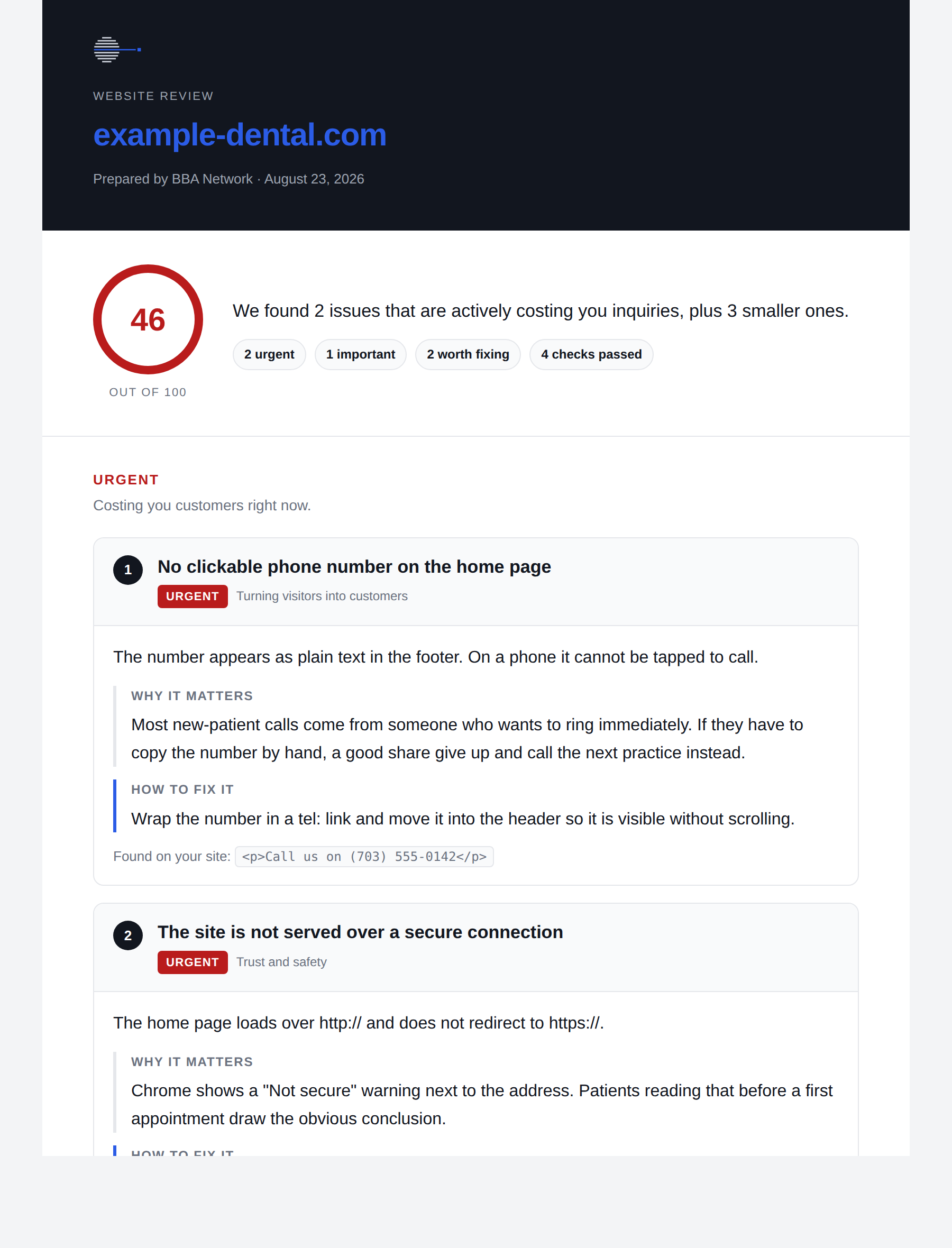
All of it, including the boring findings at the bottom. Nothing is hidden behind the price.
Most small business sites have at least one of these
A phone number that can't be tapped on a mobile. A page telling Google not to list it, left behind after a redesign. A "Not secure" warning in the address bar. None of these announce themselves — the site looks fine to you, because you already know where everything is.
You're not sure what's wrong
The site works when you check it. But inquiries are slower than they should be, and nobody can tell you why.
You've been quoted for a rebuild
Before spending thousands, it's worth knowing whether the problem is the whole site or three specific things.
You want a second opinion
Your developer says it's fine. This gives you a list you can hand them, in language you can both check.
How it works
-
Pay and enter your web address
One form. No account to create, nothing to install.
-
Your site gets checked against 22 things
Everything from whether it works on a phone to whether Google can list it.
-
You get a report within one working day
Every problem ranked by how much it's costing you, each with a specific fix. Hand it to any developer, or do the easy ones yourself.
What we look for, and what to do about it
All 22 checks, grouped. Open any one to see what it costs you and what fixing it involves — including whether it is something you can do yourself in ten minutes or a job for whoever built the site.
Turning visitors into customers
No way to get in touch from the home page
What it costs you. Someone ready to book has to go hunting, and most will call whoever is easier instead. This is usually the most expensive problem on a small business site.
What fixing it means. A tap-to-call phone number in the header on every page, and a short form.
No clear next step for a visitor
What it costs you. People read the page, feel positive, and leave — because nothing told them what to do next.
What fixing it means. One obvious button saying the thing you want them to do. "Book an appointment", not "Learn more".
Shared links show no image or description
What it costs you. When someone sends your site in a message or posts it, it appears as a bare grey link. It gets noticed far less, and looks broken.
What fixing it means. Add a handful of tags naming the title, description and an image to use.
Being found
The page title is missing or unhelpful
What it costs you. This is the blue headline in Google results. A weak one is the difference between someone clicking you or the practice below you.
What fixing it means. Write one line: what you do and where you are.
Google is writing your search listing for you
What it costs you. With no description, Google picks whatever text it finds first — often a cookie notice. That is the sentence people judge you on.
What fixing it means. Write about 150 characters naming the practice, the area and why to choose you.
The page has no clear main heading
What it costs you. Search engines use headings to work out what a page is about. Without one they guess, and often guess wrong.
What fixing it means. One main heading per page, with sub-headings under it in order.
Several addresses serve the same page
What it costs you. With www and without, http and https, Google may treat them as competing copies and split the credit between them.
What fixing it means. One tag on each page naming the address you want counted.
No business details search engines can read
What it costs you. Opening hours, address and phone number can appear directly in search results — but only if they are marked up in a way Google understands.
What fixing it means. Add a small block of business information in the format search engines expect.
The page tells Google not to list it
What it costs you. The site is invisible in search. This is almost always left behind by accident after a redesign, and can cost every search visitor you have.
What fixing it means. Remove the instruction telling search engines to skip the page.
Trust and safety
The site is not on a secure connection
What it costs you. Browsers show "Not secure" next to your address. Anyone deciding whether to trust you with an appointment reads that first.
What fixing it means. Turn on a certificate — most hosts now provide one free — and redirect the old insecure address to the new one.
No privacy policy anywhere on the site
What it costs you. If you collect enquiries you are handling personal data, and a missing policy reads as carelessness to anyone who looks.
What fixing it means. One page saying what you collect, why, and how to ask you to delete it.
Speed
The page is much heavier than it needs to be
What it costs you. On a phone away from wifi it takes seconds to appear, and a good share of people leave before it does.
What fixing it means. Usually images. Compress them, and remove anything loading that nobody looks at.
The server is slow to answer
What it costs you. Before anything can load at all, there is a wait. It makes the whole site feel sluggish regardless of how well it is built.
What fixing it means. Caching, or moving to better hosting. Often the cheapest real speed win.
Photographs are far larger than displayed
What it costs you. A 4 MB photo shown at postcard size still downloads all 4 MB. It is the most common reason a small business site feels slow.
What fixing it means. Export each image at the size actually shown and save as WebP. Usually cuts the weight by ninety per cent with no visible difference.
Too much code runs before the page appears
What it costs you. Tracking, chat widgets and plugins each add delay. Visitors stare at a blank screen while they load.
What fixing it means. Work out which are actually earning their place, remove the rest, and load what stays after the page shows.
Access for everyone
Images have no text description
What it costs you. Anyone using a screen reader hears nothing where the picture is. Search engines cannot tell what the images show either.
What fixing it means. Describe each meaningful image in a few words. Decorative ones get an empty description so they are skipped.
The page does not say what language it is in
What it costs you. Screen readers may read English in a Spanish accent, and browsers offer to translate pages that need no translating.
What fixing it means. One attribute on the page.
Form fields have no labels
What it costs you. The placeholder text vanishes as soon as someone types, so they lose track of which box is which — and screen readers announce nothing at all.
What fixing it means. A proper label attached to each field.
Technical
The site is not set up for phone screens
What it costs you. Phones show the desktop layout shrunk down, so visitors pinch and zoom to read anything. Most give up instead.
What fixing it means. One line added to the page header telling browsers to use the phone's width.
The page returns an error instead of loading
What it costs you. Visitors and Google both see an error. Nothing else on the site matters until this is fixed.
What fixing it means. Depends on the cause — usually a server or hosting problem rather than the site itself.
No icon in the browser tab
What it costs you. Your site is a blank page symbol among a dozen open tabs, and the same in everyone's bookmarks.
What fixing it means. Add a small square logo image and one line linking to it.
No sitemap for search engines
What it costs you. Google eventually finds your pages by following links. A sitemap tells it directly, so new pages appear sooner.
What fixing it means. Generate a sitemap file and reference it from robots.txt. Most site builders do this on request.
Effort and who-does-it are estimates for a typical small business site. This list is generated from the checks that actually run, so it cannot drift from what you get.
No reviews yet — so here is the deal instead
This is new. Rather than show you testimonials that do not exist, here is what I will do for the first ten people who buy one:
- A free re-check once you have made the fixes. Send it back when the work is done and I will run the whole thing again so you can see what moved.
- A call to walk you through it, free, whether or not you hire me afterwards.
- $100 stays the price for you on anything you buy later, even once it goes up.
In exchange I will ask what you thought. If it was useful, a sentence I can quote here. If it was not, tell me why — that is worth more.
One-off. No subscription, no account.
Get my website checkedSecure payment via Stripe · Card details never touch this site
Questions
What if my site turns out to be fine?
Then the report says so, and lists what's already working. That's a genuine answer, not a wasted one — it means the problem is somewhere other than the website, and you can stop spending money there. Knowing the site is fine is worth having before you pay someone to rebuild it.
Do I need to be technical to use this?
No. Every finding is written in plain English and says what it costs you in customers, not what it's called. Each one also has the specific fix, so you can hand the report to whoever maintains your site.
Will you change anything on my site?
No. This is read-only — the site is looked at exactly the way a visitor's browser looks at it. Nothing is altered, and no login is needed.
How thorough is it?
It checks your home page against 22 specific things, which is where the problems that affect every visitor live. It is not a full technical audit of every page, and the speed findings are indicators worth investigating rather than a complete performance profile. The report says this too.
How quickly will I get it?
Within one working day, by email, as a PDF you can forward to anyone.